
FOX 13 Tampa: SkyTower Weather
Fox Television Stations, Inc.Weather
3.9854.00 Reviews
- Version
- 6.2.513
- Installs
- 100.00K
- Age Rating
- Everyone
Screenshots
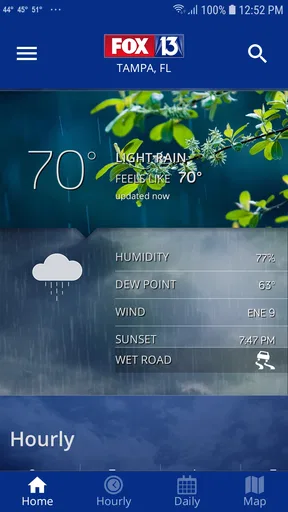
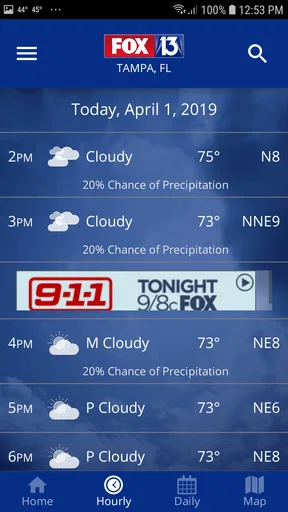
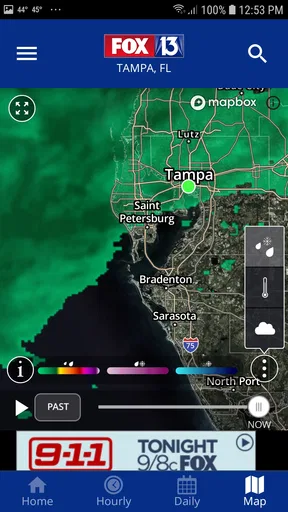
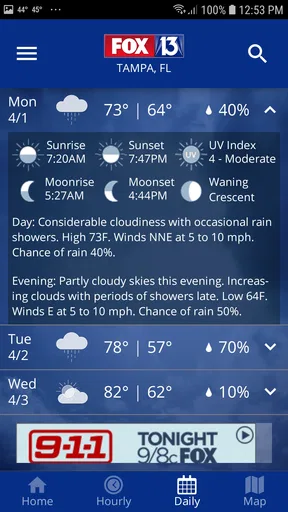
Our Review of FOX 13 Tampa: SkyTower Weather
 Analysis by Appyee
Weather apps are easy to install and surprisingly difficult to keep useful. I can enjoy one during a storm, then forget it exists once the sky clears. FOX 13 Tampa: SkyTower Weather makes a stronger first impression because it focuses on the information people in the Tampa area usually check repeatedly: the near-term forecast, live radar, and alerts. It is a free weather app from Fox Television Stations, Inc., rated for Everyone, and its local focus gives it a more practical feel than a general-purpose forecast tool.
My first-week experience with it would be summed up this way: it is most valuable when I build it into a routine rather than treat it as something I open only during dramatic weather. A quick check before leaving home, a radar look before an outdoor plan, and an alert review when conditions change are the moments where it earns its place. The app is not trying to be a broad travel planner or a lifestyle dashboard. That narrow purpose is both its main strength and the reason some people may eventually stop opening it.
What makes the first week useful
The app’s identity is clear from the beginning. FOX 13 Tampa: SkyTower Weather is a weather app built around Tampa-area forecasting, with live radar and alerts at the center of the experience. I appreciate that focus because weather information is more useful when I can get to the important part quickly. If I am deciding whether to walk the dog, drive across town, or postpone an outdoor errand, I do not need a large collection of unrelated tools. I need a readable forecast and a dependable way to see what is moving toward me.
Radar is especially helpful when the forecast alone feels too general. A percentage or a short description can tell me that rain is possible, but radar helps answer the more practical question: is the rain approaching my neighborhood, passing nearby, or already moving away? That distinction matters in Tampa, where a short change in conditions can affect a commute or an afternoon plan. I would use the radar before leaving for a beach visit, while arranging a park meetup, or when dark clouds arrive but the forecast has not yet caught up.
Alerts give the app a second reason to remain installed. A forecast is something I choose to check, while an alert can bring important information to me when conditions deserve attention. I would not treat every notification as a reason to panic, but I would use them as prompts to open the app and look at the broader situation. The useful habit is not simply receiving a warning; it is using the warning as a cue to check timing, radar movement, and the likely effect on my plans.
One practical tip is to avoid opening the app only when the weather is already unpleasant. Checking it at roughly the same points in the day makes its information easier to interpret. A morning glance helps with clothing and travel, a midday look helps with errands, and an evening check helps with the next day. This routine also shows whether the app genuinely saves time or merely adds another notification to my phone.
The app is available at no cost, which lowers the barrier to trying it alongside another weather service. That is useful during the first week because I can compare how its local presentation fits my needs without committing to a subscription. It has been available since July 7, 2014, so it is not a brand-new experiment looking for its audience. At the same time, its current version, 6.2.513, reminds me that the app is maintained as an ongoing product rather than a one-time forecast screen.
How I would use it in an ordinary Tampa day
Imagine I have a morning appointment, a lunch break outside, and a child’s sports practice later in the day. I would begin with the forecast to decide what to wear and whether to carry rain protection. Before leaving for lunch, I would open the radar instead of relying only on the morning outlook. In the afternoon, I would check again before practice and pay attention to any alert that changes the plan. That sequence is more realistic than expecting a single forecast to remain equally useful all day.
The non-obvious benefit here is continuity. The app can become a small decision tool rather than a dramatic-weather app. I do not need to study every screen. I can use the forecast for planning, radar for timing, and alerts for exceptions. Keeping those jobs separate makes the app easier to understand and prevents me from overreacting to one isolated forecast detail.
It is also a reasonable choice for someone who prefers local television weather coverage and wants a related mobile option. The developer, Fox Television Stations, Inc., gives the app a recognizable local-news connection. That does not automatically make every forecast perfect, but it makes the product feel more relevant to a Tampa user than an app designed primarily around worldwide locations and broad customization.
Where the value holds up after the novelty
The first week is usually the easiest part of any weather app. The real test is whether I still have a reason to open it after I have explored the radar and adjusted my notification habits. For this app, recurring value comes from repetition: changing weather, local plans, and the need to make small decisions throughout the week. If my routine includes commuting, outdoor work, school pickups, boating, sports, or regular errands, the app has more chances to prove its usefulness.
Its local orientation is important over time. A general weather app may be perfectly adequate for checking a temperature, but I am more likely to keep a specialized local app when I want a quick look at conditions affecting the Tampa area. The difference is not that every screen must be more detailed. It is that the app’s purpose stays connected to the place where I actually live or spend time.
I would particularly recommend it to people who plan around short outdoor windows. A gardener deciding when to work, a cyclist choosing a departure time, or a parent arranging an afternoon activity can benefit from checking radar instead of guessing from the appearance of the sky. These are modest use cases, but they repeat often enough to create lasting value. The app does not have to entertain me; it only has to help me make those decisions with less uncertainty.
Another useful workflow is to check the app before making a decision that would be annoying to reverse. If I am driving to an outdoor event, starting a load of laundry, or leaving equipment outside, I can make a quick forecast-and-radar check first. This is more valuable than endlessly refreshing the app. The goal is not perfect prediction. The goal is to avoid preventable surprises when a two-minute check would have changed my timing.
Its audience size suggests that it has found a meaningful group of users: the app has more than one hundred thousand installs and around three thousand ratings, with an average rating of 3.9. I read that as a sign of practical usefulness with room for individual dissatisfaction. A rating in that range does not justify unconditional praise, but it does fit my impression of a focused utility that works well for some routines and feels unnecessary for others.
The app also benefits from being free when I compare it with paid or subscription-based weather alternatives. A free local option is easier to keep as a second opinion, especially if I already use a larger weather platform for travel or multiple locations. I might not replace every other weather tool with it, but I can give it a specific job: local radar and alerts for Tampa, while another service handles broader planning.
When another weather app may be better
I would look elsewhere if I needed extensive international coverage, detailed travel planning, or a highly personalized dashboard spanning many cities. Someone who regularly moves between states or countries may prefer an app designed around multiple saved locations. Likewise, a weather enthusiast looking for deep historical information, specialized maps, or extensive data layers may find a local broadcast-oriented app too focused.
I would also hesitate to make it my only source for high-stakes decisions. Weather apps are useful aids, but outdoor work, marine travel, emergency preparation, and serious storm decisions deserve careful attention to official warnings and context. FOX 13 Tampa: SkyTower Weather can help me notice changing conditions and decide when to investigate further, but I would not confuse convenience with a guarantee.
That distinction is one of the app’s most important trade-offs. Its simplicity can make everyday checking faster, but a simpler tool may not satisfy users who want to customize every detail. I would choose it for quick local awareness, not for building a personal meteorological command center.
The maintenance cost of keeping it useful
Weather apps usually have a low maintenance burden, but “low” does not mean zero. The first task is deciding how much notification activity I actually want. Alerts can be valuable when they draw attention to meaningful changes, yet too many interruptions can make me dismiss everything automatically. My advice is to treat notifications as a limited resource: keep them useful enough to earn attention, then review the app directly when planning something important.
Location settings are another part of the routine. A local Tampa app makes the most sense when its forecast location matches where I spend time. If I travel, I should remember to check whether I am viewing conditions for home or for the place I am visiting. A common mistake with any weather app is assuming that the last location on screen is still the location that matters today.
I would also keep the application updated through the normal app-store process. Its current version is 6.2.513, and updates can affect reliability, layout, or compatibility. The minimum operating-system requirement is iOS or Android version 9, which makes it accessible to many older devices. That is helpful for people who do not replace their phone frequently, although older hardware can still influence how quickly any modern app opens or refreshes.
There is a useful maintenance habit that many people overlook: periodically test whether alerts still match real life. If I changed neighborhoods, altered my daily schedule, or no longer spend time outdoors at the same hours, old notification habits may no longer help. I would rather adjust the app once every few weeks than allow irrelevant warnings to train me to ignore the important ones.
Privacy and battery expectations should also be handled realistically. A weather app may be most convenient when it can present local conditions, but I would review its permission prompts instead of accepting every option automatically. If I care about battery life, I would avoid unnecessary background behavior and use the app when I need it. The best setup is the smallest amount of access that still supports the way I plan to use local forecasts and alerts.
What can cause fatigue over time
The biggest source of fatigue is repetition without a clear decision attached to it. If I open the app several times a day simply to watch the temperature change, it will probably lose its appeal. The app works better when I connect each visit to an action: leave now, wait an hour, bring rain protection, move an activity indoors, or check again before committing to a longer trip.
Notifications can create a second kind of fatigue. Alerts are one of the reasons to install the app, but they can become background noise if they arrive too often or do not match my personal threshold for concern. I would not judge the entire app by one irritating notification pattern before adjusting my settings. Still, if I cannot make the alert experience fit my routine, that is a legitimate reason to use another weather service.
There is also a tension between local focus and broader usefulness. When I am at home in Tampa, the narrow scope feels efficient. When I travel, the same focus may feel less convenient than an app built around a larger collection of locations. This is not a flaw for its intended audience, but it affects whether it deserves permanent space on my phone. A product can be good at its job and still not be the right single weather app for someone with changing locations.
The app’s age can be read in two ways. Its long availability suggests staying power, while the more modest rating indicates that not every user has had an equally smooth experience. I would not let either fact decide the matter alone. I would install it, use it through a normal weather cycle, and judge whether the forecast, radar, and alert combination saves me time. That test is more meaningful than assuming longevity guarantees perfection.
Another trade-off is the temptation to treat radar as certainty. Radar is excellent for understanding movement and timing, but it does not remove the uncertainty of local weather. I would use it to improve a decision, not to promise myself that rain will miss a particular street or event. This is a small but important distinction, especially when plans depend on a narrow window of dry weather.
Who should keep it installed
I think the strongest audience is a Tampa resident or regular visitor who wants a straightforward local weather companion. It suits people who check conditions before commuting, spend time outdoors, or want alerts connected to the area around them. It is also a sensible free addition for anyone who already uses a general weather app but wants a second local perspective without paying for another service.
Families may find the routine useful because weather decisions happen several times a day: school travel, outdoor play, appointments, and evening plans. Outdoor workers can use the forecast and radar as part of a broader planning process. Visitors can benefit during a short stay when local conditions matter more than a worldwide forecast interface.
I would skip it if I rarely need Tampa-specific information, dislike weather notifications, or expect advanced customization. I would also skip making it the only tool for specialized or safety-critical planning. In those cases, a broader weather platform or official source may be a better match, depending on the decision involved.
For me, the deciding question is simple: does the app help me act, or does it merely give me another screen to browse? FOX 13 Tampa: SkyTower Weather earns its place when I use its forecast, radar, and alerts as three different tools with three different purposes. If I only want a temperature glance, my phone’s built-in weather option may already be enough.
My long-term verdict
After the novelty fades, this app remains useful because its value is tied to recurring local decisions rather than a one-time discovery. I like the focused combination of Tampa weather information, radar, and alerts, and I appreciate that it is free and available to users on relatively older operating systems. The developer’s local television identity also gives the app a clear reason to exist beside more generic weather tools.
My recommendation comes with boundaries. I would keep it installed if I lived in or regularly visited Tampa and wanted a quick local check before making outdoor or travel decisions. I would not choose it as my only weather solution if I needed many locations, deep customization, or specialized forecasting information. Its moderate average rating also encourages a practical trial rather than blind confidence: let the app prove that its presentation and notifications fit your routine.
The best way to get lasting value is to create a small habit around it. Check the forecast when planning, use radar when timing matters, and treat alerts as prompts to investigate rather than as automatic instructions. Keep notifications selective, revisit location settings after travel, and avoid opening the app without a decision in mind. That simple routine turns a local weather app from a novelty into a dependable daily tool.
Overall, I would recommend FOX 13 Tampa: SkyTower Weather to Tampa-area users who want practical local awareness without paying for another service. It is not the most universal choice, and it will not satisfy every weather enthusiast, but it has a clear job and performs best when that job matches your life. For the right user, that clarity is exactly what makes it worth keeping.
Verdict
Strengths of FOX 13 Tampa: SkyTower Weather
- Accurate local forecasts tailored to Tampa Bay neighborhoods.
- Live radar helps track storms as they approach your area.
- Severe weather alerts can provide valuable advance warning.
- SkyTower camera views offer useful real-time conditions.
- Clean layout makes key weather information easy to find.
Limitations of FOX 13 Tampa: SkyTower Weather
- Some alerts may feel frequent during active weather periods.
- Radar and video features can use significant mobile data.
- Forecast accuracy may vary during fast-changing tropical storms.
- Some features may depend on location permissions being enabled.
- Coverage is primarily focused on the Tampa Bay region.
Other Releases by Fox Television Stations, Inc.
View All
FOX 4: DFW WAPP - Weather
Weather3.8

FOX LOCAL: Live News & Weather
News & Magazines4.4
Similar Picks in This Category
View All
Weather - By Xiaomi
Xiaomi Inc.4.1

Weather & Radar Forecast
WetterOnline4.8

Weather
OneLouder Apps4.6

AccuWeather: Weather Radar
AccuWeather3.6

The Weather Channel - Radar
The Weather Channel4.6

1Weather Forecasts & Radar
OneLouder Apps4.3
Frequently Asked Questions
What is FOX 13 Tampa: SkyTower Weather?
FOX 13 Tampa: SkyTower Weather is a weather app focused on the Tampa Bay area and surrounding communities. It provides current conditions, hourly and extended forecasts, radar maps, severe weather alerts, and updates from the FOX 13 weather team. The app is especially useful for tracking tropical systems, thunderstorms, heavy rain, lightning, and rapidly changing local conditions.
Does the app provide accurate Tampa Bay weather forecasts?
The app combines weather data with local reporting from FOX 13 meteorologists, making it more useful for Tampa Bay residents than a generic national weather application. Forecast accuracy can still vary, particularly during tropical storms or fast-moving thunderstorms, because weather conditions change quickly. Users should compare important warnings with official notifications from local and national emergency agencies.
Can FOX 13 Tampa: SkyTower Weather send severe weather alerts?
Yes, the app can provide notifications for significant weather events, depending on the alert settings enabled on your device. These may include severe thunderstorms, tornado risks, tropical weather, flooding, lightning, and other hazardous conditions. After installation, review location permissions and notification preferences carefully so alerts are relevant to your area and are not accidentally disabled.
Does the app include radar and hurricane tracking features?
FOX 13 Tampa: SkyTower Weather includes weather visualization tools such as radar imagery and forecast maps that help users follow rain and storm movement. These features are particularly valuable during Florida’s rainy season and hurricane season. However, radar and tracking information should be treated as a monitoring aid, not a substitute for evacuation instructions or official emergency-management guidance.
Is FOX 13 Tampa: SkyTower Weather free to download and use?
The app is generally available as a free download for compatible Android and iOS devices, although availability, advertising, and certain features may change over time. It may request permission to use your location and send notifications to deliver localized forecasts and warnings. Before downloading, check the current store listing for device requirements, privacy details, and any optional purchases.
